


Remote Test Management
WAPT Pro allows running tests on a remote computer anywhere in the Internet.
You can find a powerful server and install the Load Agent on it (for example, by means of
Remote Desktop Connection software).
Then you will be able to run tests on that server from your local machine.
Your computer will be used only for test management purposes
(from the initial design of test sequence to the final reporting).
The actual emulation of virtual users during the test will be performed by Load Agent running on the remote server.
Thus you will be able to manage the testing process remotely from your workstation.
You can install Load Agent on a server with a superior hardware configuration and let many test engineers connect to
it from their workstations to perform their testing. They can even run their tests concurrently, provided that the
performance of the server is sufficient to handle this.
To perform remote test runs,
you should install WAPT Pro Workplace on your computer and
install the Load Agent on a remote server provided that it has a TCP/IP connection to your computer.
Load Agent is installed as a Windows service, so you will not need to launch it each time you want to perform testing.
Then you should add the remote Load Agent to the list of agents in WAPT Pro Workplace:
1. Select Distributed test run -> Load Agents
in the Navigation Pane to switch to the Load Agents view.
2. If your agent is located outside
LAN, you can add it
using the Add button. This button opens a dialog where you can specify agent settings.
If you want to add an agent installed on one of computers in your Local Area Network,
click Search LAN for available load agents. This button searches for agents in
your Local Area Network. The program uses the default port 9475
to search for Load Agents and establish connections to them.
However, you can uncheck the Use default port option and specify another port.
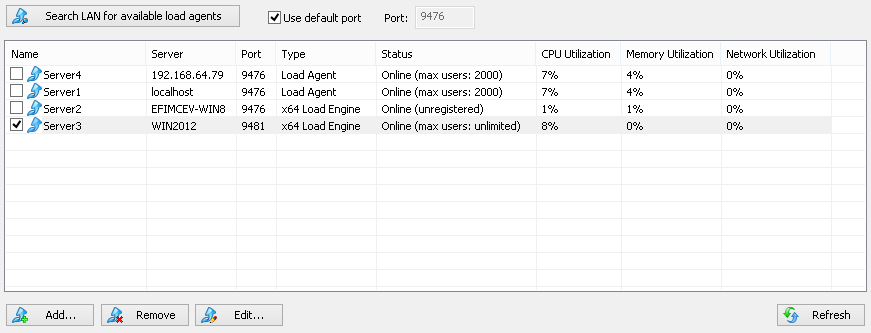
3. You can see agent's type (Load Agent, x64 Load Engine or Cloud Engine), status (Online or Offline),
maximum available number of users and percentage of CPU, Memory and Network utilization. Each utilization
value is the result of data averaging over the last 30 seconds for that agent.
 If utilization reaches 80% (warning level),
the line with agent is highlighted in yellow.
If utilization reaches 80% (warning level),
the line with agent is highlighted in yellow.
If utilization reaches 98% (overload level),
the line is highlighted in red.
4. Put a checkmark near agent to
use it in your tests.
To generate a higher load you can use WAPT Cloud Load Engines
for your load tests in WAPT Pro. Cloud Engines are available at capacities of 2,000, 5,000 and 10,000 virtual users per system.
The total generated load can reach up to 1 million users.
You can use the following buttons to manage the list of agents.
Add: Adds a new Load Agent to the list. You should specify agent settings in the displayed dialog.
Remove: Removes a selected agent from the list.
Edit: Opens a dialog where you can edit the settings of selected agent.
Refresh: When you click this button, WAPT Pro Workplace tries to
reconnect to those Load Agents in the list that have the status "Offline".
If you use 2 or more agents in your test, you
can execute different profiles on different load agents.
You can choose a specific load agent or several agents for execution of any profile.
This can be done in the Test Volume view of scenario options.
If you execute one profile on several load agents, WAPT Pro Workplace
will reallocate tasks between
agents automatically depending on the resources available on each system.
When some agent becomes low in system resources, it stops receiving additional tasks, and they are allocated to other
agents.
See also: Preparing a Distributed Test Run


