


System Requirements and Installation
Operation System Requirements
 Microsoft® Windows Server 2008/2012/2016 or Windows Vista/7/8/10
Any installed browser:
Microsoft IE 6 (or higher), Firefox 3.0 (or higher), Google Chrome
About 10 MB of free disk space
for program files and 50-500 MB for virtual users' logs and test run results
Note. If Internet Explorer is not installed on your system, then
the embedded WAPT Pro
Recorder will not work;
"Browser View" on the Response processing
tab of request properties will not work either.
Besides, you will not see help
topics by clicking "Getting Started", "Profiles", "Scenario", "Distributed Test Run", "Results" and "Logs" items
in the left pane.
Recommended Hardware Configuration
WAPT/WAPT Pro workplace component/extension modules:
Pentium 4/Athlon XP or better CPU,
2 Gb RAM or more, Gigabit Ethernet
Load Agent:
Pentium 4/Athlon XP or better CPU,
4 Gb RAM or more, Gigabit Ethernet
Installation of the 32-bit version
You should have administrative rights on your system to install WAPT Pro.
The installation process takes a minute or so.
All you need to do is to follow the instructions of the Wizard.
WAPT Pro creates a comprehensive testing environment which consists of one or several workstations
with the WAPT Pro Workplace component installed on each of them, and several load generation servers
running WAPT Pro load agents. The workplace component can be installed on any workstation with the
modest hardware configuration. Load agents should be installed on servers with a more powerful hardware configuration.
On this screen you select what components to install:
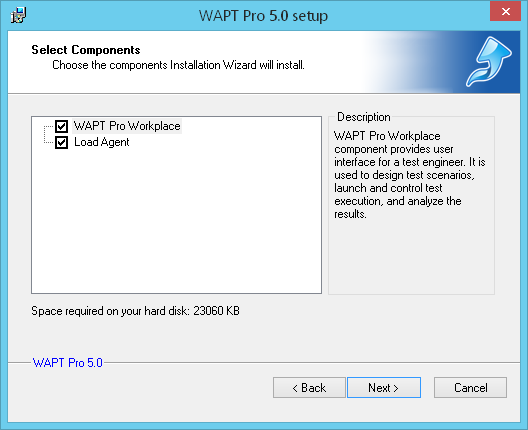 WAPT Pro Workplace:
This component provides the user interface for test engineers. It is used to
design test scenarios, launch and control test execution, and analyze the results.
You should install WAPT Pro Workplace
on the main machine where you will
manage test runs. During tests the workplace component
will automatically distribute the load among all specified agents and gather the results of test run.
WAPT Pro Workplace:
This component provides the user interface for test engineers. It is used to
design test scenarios, launch and control test execution, and analyze the results.
You should install WAPT Pro Workplace
on the main machine where you will
manage test runs. During tests the workplace component
will automatically distribute the load among all specified agents and gather the results of test run.
Load Agent:
This component is used for emulation of user activity and test load generation.
You should install it on one or several servers where tests will be performed.
Agents are installed as Windows services. They receive all the necessary information for the test from
WAPT Pro Workplace, create the
specified load and return the results of test run.
You can perform the full installation of the product
(WAPT Pro Workplace + Load
Agent), or install only WAPT Pro Workplace on your computer,
or only Load Agent.
Select both components on the screen above to perform the full installation of the product.
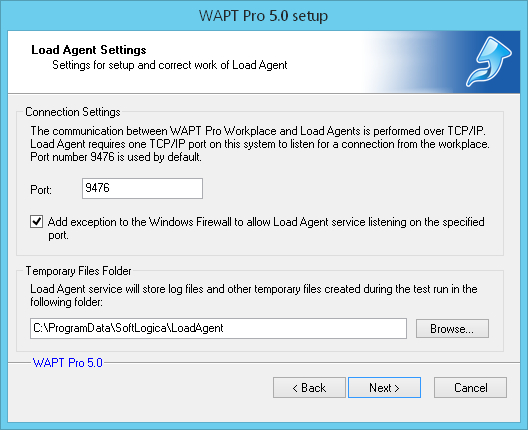 Here you should specify the settings for setup and correct work of Load Agent.
Port: The communication between agents and workplace component is performed over TCP/IP. Here
you can change the default port that will be used by WAPT Pro Workplace
to search for Load Agents in the Local Area Network and establish connections to them.
Add exception to the Windows Firewall to allow Load Agent service listening on the specified port:
This option adds a special exception to the Windows Firewall that allows
the Load Agent service occupy any port and connect to any address.
Temporary Files Folder: Here you can change the default location for Load Agent log files and other
files required during test runs.
Click Next to continue.
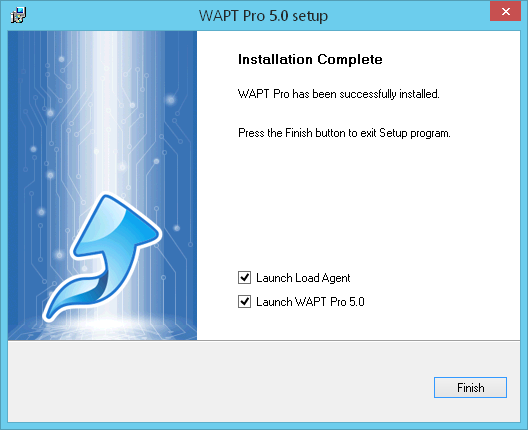 This is the last page of the Installation Wizard.
Launch Load Agent: Automatically launches the Load Agent service after setup. You can also start the
service manually at any time using the Load Agent Manager.
Load Agents are installed as Windows services, so you will not need to launch them each time you want to perform testing.
Launch WAPT Pro 5.0: Automatically runs WAPT Pro 5.0 after setup. Besides,
you can open the program by clicking the WAPT Pro shortcut
on your Desktop, Quick Launch, or Windows Start menu.
Click Finish to complete the installation. There is no need to reboot.
Note. We do not recommend installing WAPT Pro on a server you are testing, because test results can be skewed in this case due to the high load on the server.
Installation of the 64-bit version
When you install the 64-bit version of WAPT Pro, the installer suggests you to install 2 components:
WAPT Pro Workplace (64-bit) and Load Agent (32-bit):
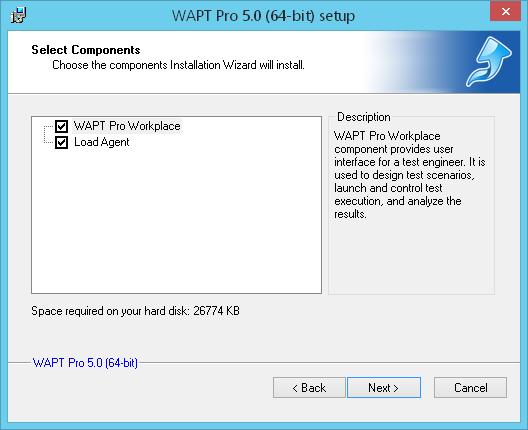 All steps of installation are the same as for the 32-bit version of WAPT Pro.
The functionality of the 32-bit and 64-bit versions is identical.
The only difference is that the 32-bit WAPT Pro has restriction on the size of used
virtual memory (2 GB), while the 64-bit WAPT Pro can use all available virtual memory.
This advantage allows the 64-bit version run tests with high volume of data:
tests where the total number of requests is big,
tests with a big number of dynamic parameters,
long-duration tests that gather much statistic data.
Uninstall
To uninstall WAPT Pro, follow the steps below:
Close the program window.
On the Windows Start menu,
choose SoftLogica -> Uninstall WAPT Pro.
The window of Uninstallation Wizard will appear, just follow Wizard instructions.
You can also use the following way to perform the uninstall operation.
On the Windows Start menu,
select Control Panel,
choose Programs and Features, find WAPT Pro/WAPT Pro (64-bit) in the list of currently
installed programs and click the Uninstall button.
Uninstallation removes all components added to your system
during the installation (WAPT Pro Workplace and
Load Agent). Load Agent service is stopped and removed.


