


Toolbar
The program toolbar allows you to perform program operations with a number of buttons.
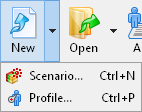 New: Creates either a new test scenario, or a new user profile.
 Scenario... (Ctrl+N):
Creates a new test scenario. By clicking this option,
a New Scenario Wizard is initiated. This wizard will help you create a new test scenario
depending on your test goals.
Scenario... (Ctrl+N):
Creates a new test scenario. By clicking this option,
a New Scenario Wizard is initiated. This wizard will help you create a new test scenario
depending on your test goals.
Profile... (Ctrl+P):
Creates a new user profile. By clicking this option, the
New Profile dialog appears.
Enter a new profile name and specify a file where it will be saved to.
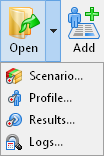 Open..: Opens either a file with test scenario, or user profile, or test results, or a folder
with generated log files.
Open..: Opens either a file with test scenario, or user profile, or test results, or a folder
with generated log files.
Scenario... (Ctrl+O):
Opens a file with test scenario.
In the displayed dialog, select a desired file and click Open.
WAPT Pro scenario files have the extension .wpsx.
Profile..:
Opens a file with user profile and adds that profile to the current test scenario.
In the displayed dialog, select a desired file and click Open. WAPT Pro
profile files have the extension .wppx.
Results..:
Opens WAPT Pro result file
which contains test results and also test scenario and profiles used to get these results.
You will be able to
view test results in the
form of Summary Report, Summary Graphs and graphs for
all user profiles and individual pages.
In the displayed dialog, select a desired file and click Open.
WAPT Pro result files have the extension .wprx.
Logs..:
Opens a folder containing log files generated earlier in WAPT Pro.
In the displayed dialog, select a desired folder with log files and click Open.
WAPT Pro will parse log files from the selected folder and display information in the
Logs tree view.
Log files generated in WAPT Pro have the extension .log.
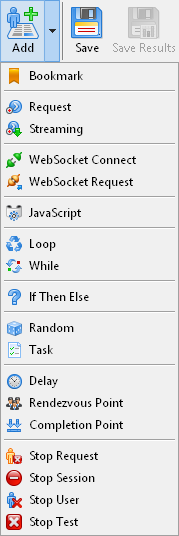 Add: Using this button you can add a new bookmark, a new request, or operator selected in the list.
Bookmark:
Adds a new bookmark after the selected request.
Request:
Adds a new request to the selected profile.
Streaming:
Adds a new streaming request to the selected profile.
JavaScript/Loop/While/If Then Else..:
Adds a selected operator to the current profile.
 Save:
Saves changes made in the current test scenario and user profiles.
Save:
Saves changes made in the current test scenario and user profiles.
 Save
Results:
Saves results of test run in selected format. You can select the following
options:
Save
Results:
Saves results of test run in selected format. You can select the following
options:
HTML Files (*.html;*.htm)
CSV (Comma separated values) (*.csv)
WAPT Pro Results Files (*.wprx)
If you save test results in CSV format, you will be able to import them later, any time you wish
to Microsoft® Excel.
The extension .wprx is WAPT Pro extension for test result files.
After saving, you will be able to open that file in WAPT Pro and view the results
in the form of text reports and graphs. WAPT Pro results
file also includes the current test scenario and profiles used to get the results.
 Rec:
Starts the process of recording web pages.
WAPT Pro records your
activity in program built-in browser as you navigate through a web site.
You will see a dialog where you will need to specify a
profile for recording.
Rec:
Starts the process of recording web pages.
WAPT Pro records your
activity in program built-in browser as you navigate through a web site.
You will see a dialog where you will need to specify a
profile for recording.
 Stop
Rec: Stops the recording process.
Stop
Rec: Stops the recording process.
 Verify Test:
Validates the current test scenario by
running the selected user profiles once with full logging.
You can validate your test scenario before running the test to make sure that it does not contain errors.
Verify Test:
Validates the current test scenario by
running the selected user profiles once with full logging.
You can validate your test scenario before running the test to make sure that it does not contain errors.
 Run Test:
Runs the test.
If you scheduled your test run, then the test will start
at the specified time (you can set the scheduling options in the Test Volume view).
Run Test:
Runs the test.
If you scheduled your test run, then the test will start
at the specified time (you can set the scheduling options in the Test Volume view).
 Stop
Test: Interrupts the test execution.
This operation is not momentary. The program waits until
the already requested URLs are loaded and then interrupts the test.
Stop
Test: Interrupts the test execution.
This operation is not momentary. The program waits until
the already requested URLs are loaded and then interrupts the test.
 Settings:
Opens the Settings dialog where you can view and modify program settings.
Settings:
Opens the Settings dialog where you can view and modify program settings.
 Help Topics:
Shows WAPT Pro Help topics.
Help Topics:
Shows WAPT Pro Help topics.
 Ask for Assistance:
Opens the assistance request dialog where you can
ask for assistance from WAPT team.
Ask for Assistance:
Opens the assistance request dialog where you can
ask for assistance from WAPT team.


