
WAPT 4.0
Home Product Features Updates Download Order Support Distribution SoftLogica
 
New Test Scenario Wizard
../Accurate real user simulation
Dynamic test data generation  
Recording & Playback of HTTPS/SSL pages  
Flexible test volume & load definition  
Clear reports and graphs  
Full log of virtual user activity  
 
WAPT: Load and Stress Testing

 Name:
 E-mail:

Subscribe to SoftLogica Newsletter to get 10% discount on newly released products!


  Go to Index
How to Set up Multiple
IP Addresses on a Computer


There are several ways to set up multiple IP addresses on a computer:

1. To have multiple network interface cards (NICs) on your computer and to assign a different IP address to each card.
2. To assign multiple IP addresses to a single NIC.
3. To combine 2 previous options: have multiple NICs with multiple IPs assigned to one or more of them.

By default, each network interface card (NIC) has its own unique IP address. However, you can assign multiple IP addresses to a single NIC.

How to assign multiple IP addresses to the same NIC

If you want to assign more than one IP address to a network card on Windows 2000, follow the steps below.

  1. Right-click on My Network Places, choose Properties.
  2. Right-click on the Local Area Connection, choose Properties.
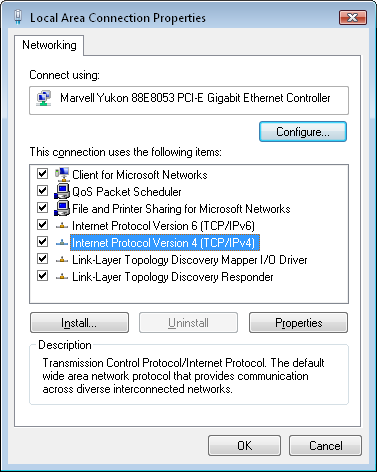


  3. Highlight Internet Protocol (TCP/IP), click Properties.
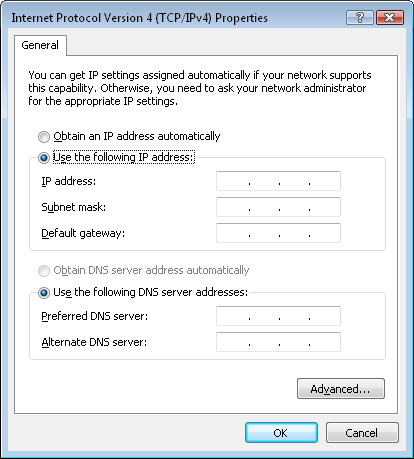


  4. If you use DHCP, you should disable it: click Use the following IP address and enter IP address, Subnet mask and Default gateway.
  5. Click Advanced... at the bottom.
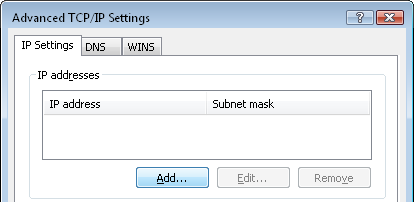


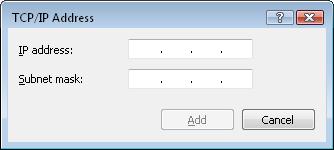
  6. Enter additional IP addresses: click the Add... button and enter a new IP address and Subnet mask.

If you use Windows NT 4.0, the whole procedure will be the same, except several steps:
  • Right-click on Network Neighborhood, choose Properties
    (if it is impossible, run Network Control Panel on Control Panel).
  • Highlight TCP/IP Protocol, click Properties.
  • After you have added desired IP addresses, save all changes and restart your computer.
  Next page

Download
Download
Order Now


03/21/2006 WAPT successfully passed the 'Designed for Windows XP' certification by Microsoft(R)


People who buy WAPT also often purchase:
People who purchase WAPT also often purchase WSOP! Optimize your Website Loading Times
Better Together
Total list price: $347
Buy together: $297
 
Buy both Now!

SiftLogica
Revieved by BUILDER.COM  
  Copyright © SoftLogica LLC. 2002-2006     Contact: support@loadtestingtool.com