Server Monitoring Software Stop losing clients due to late detection of web server glitches. Monitor availability and performance of your servers and network resources.
Load Agents
Load Agents
With WAPT Pro you can distribute the load between several computers and perform
a distributed test run. Such tests will let you emulate almost any desired number of simultaneously acting virtual users.
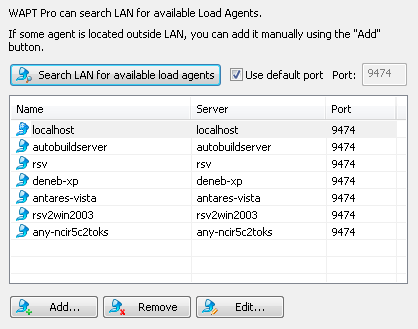
On this page of Settings Wizard you can specify one or several Load Agents for your test runs.
Agents will emulate user activity and produce the load during tests. All agents are controlled
from the system running WAPT Pro Workplace.
The workplace component is used to design test scenarios, launch and control test execution, and analyze the results.
Click Search LAN for available load agents to search for agents in
the Local Area Network. The program uses the default port 9474
to search for Load Agents and establish connections to them.
However, you can uncheck the Use default port option and specify another port.
If some agent is located outside LAN, you can add it
manually using the Add button. This button
opens a dialog where you can specify the settings of new agent.
Remove: Removes a selected agent from the list. Edit: Opens a dialog where you can edit the settings of selected agent.
You will be able to edit the list of agents later in the
Load Agents view of the program.







 Products












 Stop losing clients due to late detection of web server glitches. Monitor availability and performance of your servers and network resources.